Are you really writing true generic hooks?

I'm a Front-end developer with a passion for building scalable and maintainable applications. I love to code in JavaScript, TypeScript, React, and C++;
This is part 2 of "I promise this hook will blow your 1000+ lines of Async code"
WoW, part 1 got a solid response, if you haven't checked that yet go ahead here, it shows how this hook can help you write clean, robust and readable code.
But as promised this part is the real deal, we will not only learn how to think and build such an awesome hook but also how to develop true generic custom hooks, the menu for the day:
- Extracting logic from component to custom hook
- Making the hook generic
- Making reducer method more elegant
- Making the hook more robust
- Implementing reset state functionality
Tons of stuff, Fasten your seatbelt we are in for some ride!
We used the final version of our hook to refactor the BookInfo component in the last part, also explained what these components are and what they are doing. If you haven't still read that, go check that out first, here.
import * as React from 'react'
import {
  fetchBook,
  BookInfoFallback,
  BookForm,
  BookDataView,
  ErrorFallback,
} from '../book'

function BookInfo({bookName}) {
  const [status, setStatus] = React.useState('idle')
  const [book, setBook] = React.useState(null)
  const [error, setError] = React.useState(null)

  React.useEffect(() => {
    if (!bookName) {
      return
    }
    setStatus('pending')
    fetchBook(bookName).then(
      book => {
        setBook(book)
        setStatus('resolved')
      },
      error => {
        setError(error)
        setStatus('rejected')
      },
    )
  }, [bookName])

  if (status === 'idle') {
    return 'Submit a book'
  } else if (status === 'pending') {
    return <BookInfoFallback name={bookName} />
  } else if (status === 'rejected') {
    return <ErrorFallback error={error}/>
  } else if (status === 'resolved') {
    return <BookDataView book={book} />
  }

  throw new Error('This should be impossible')
}

function App() {
  const [bookName, setBookName] = React.useState('')

  function handleSubmit(newBookName) {
    setBookName(newBookName)
  }

  return (
    <div className="book-info-app">
      <BookForm bookName={bookName} onSubmit={handleSubmit} />
      <hr />
      <div className="book-info">
        <BookInfo bookName={bookName} />
      </div>
    </div>
  )
}

export default App
Extracting the logic into a custom hook
Plan A:
We will decouple the effects and state from the BookInfo component and manage them in our custom hook only, we will let users(users of hooks) pass just a callback method and dependencies and the rest will be managed for them.
Here's how our useAsync hook looks like now:
function useAsync(asyncCallback, dependencies) {
  const [state, dispatch] = React.useReducer(asyncReducer, {
    status: 'idle',
    data: null,
    error: null,
  })

  React.useEffect(() => {
    const promise = asyncCallback()
    if (!promise) {
      return
    }
    dispatch({type: 'pending'})
    promise.then(
      data => {
        dispatch({type: 'resolved', data})
      },
      error => {
        dispatch({type: 'rejected', error})
      },
    )
  }, dependencies)

  return state
}

function asyncReducer(state, action) {
  switch (action.type) {
    case 'pending': {
      return {status: 'pending', data: null, error: null}
    }
    case 'resolved': {
      return {status: 'resolved', data: action.data, error: null}
    }
    case 'rejected': {
      return {status: 'rejected', data: null, error: action.error}
    }
    default: {
      throw new Error(`Unhandled action type: ${action.type}`)
    }
  }
}
Notice how asyncReducer is declared and defined below it is called. JS feels like magic, not much if you know about Hoisting, if you don't, check this out.
And now we can use our hook like:
function BookInfo({bookName}) {
const state = useAsync(
    () => {
      if (!BookName) {
        return
      }
      return fetchBook(BookName)
    },
    [BookName],
  )

const {data: Book, status, error} = state

//rest of the code same as above
This looks good but this is nowhere near our final version and it has some shortcomings:
Unfortunately, the ESLint plugin is unable to determine whether the dependencies argument is a valid argument for useEffect, normally it isn't bad we can just ignore it and move on. But, there’s a better solution.
Instead of accepting dependencies to useAsync, why don’t we just treat the asyncCallback as a dependency? Any time it changes, we know that we should call it again. The problem is that because it depends on the bookName which comes from props, it has to be defined within the body of the component, which means that it will be defined on every render which means it will be new every render. Phew, This is where React.useCallback comes in!
useCallback accepts the first argument as the callback we want to call, the second argument is an array of dependencies which is similar to useEffect, which controls returned value after re-renders.
If they change, we will get the callback we passed, If they don't change, we’ll get the callback that was returned the previous time.
function BookInfo({bookName}) {
const asyncCallback = React.useCallback(() => {
    if (!BookName) {
      return
    }
    return fetchBook(BookName)
  }, [BookName])
}

const state = useAsync(asyncCallback)
//rest same
Making the hook more generic
Plan B:
Requiring users to provide a memoized value is fine as we can document it as part of the API and expect them to just read the docs 🌚. It’d be way better if we could memoize the function, and the users of our hook don’t have to worry about it.
So we are giving all the power back to the user by providing a (memoized) run function that people can call in their own useEffect and manage their own dependencies.
Now the useAsync hook look like this :
//!Notice: we have also allowed users(hook user) to send their own initial state
function useAsync(initialState) {
  const [state, dispatch] = React.useReducer(asyncReducer, {
    status: 'idle',
    data: null,
    error: null,
    ...initialState,
  })

  const {data, error, status} = state

  const run = React.useCallback(promise => {
    dispatch({type: 'pending'})
    promise.then(
      data => {
        dispatch({type: 'resolved', data})
      },
      error => {
        dispatch({type: 'rejected', error})
      },
    )
  }, [])

  return {
    error,
    status,
    data,
    run,
  }
}
Now in the BookInfo component:
function BookInfo({bookName}) {
 const {data: book, status, error, run} = useAsync({
    status: bookName ? 'pending' : 'idle',
  })

 React.useEffect(() => {
    if (!bookName) {
      return
    }
    run(fetchBook(bookName))
  }, [bookName, run])
.
.
.
}
Yay! We have made our own basic custom hook for managing Async code.
Now, let's add some functionality and make it more robust.
Making reducer method elegant 🎨
Our asyncReducer looks like this:
function asyncReducer(state, action) {
  switch (action.type) {
    case 'pending': {
      return {status: 'pending', data: null, error: null}
    }
    case 'resolved': {
      return {status: 'resolved', data: action.data, error: null}
    }
    case 'rejected': {
      return {status: 'rejected', data: null, error: action.error}
    }
    default: {
      throw new Error(`Unhandled action type: ${action.type}`)
    }
  }
}
Have a look at it for a minute.
Notice that we are overdoing stuff by checking action.type and manually setting different objects of the state according to it.
Look at the refactored one:
const asyncReducer = (state, action) => ({...state, ...action})
Wth did just happen?
This does the same thing as previous, we have leveraged the power of JS and made it elegant. We are spreading the previous state object and returning the latest one by spreading our actions, which automatically handles collisions and gives more priority to actions because of their position.
Making the hook robust
Consider the scenario where we fetch a book, and before the request finishes, we change our mind and navigate to a different page. In that case, the component would unmount but when the request is finally completed, it will call dispatch, but because the component is unmounted, we’ll get this warning from React:
Warning: Can't perform a React state update on an unmounted component. This is a no-op, but it indicates a memory leak in your application. To fix, cancel all subscriptions and asynchronous tasks in a useEffect cleanup function.
To overcome this we can prevent dispatch from being called if the component is unmounted.
For this, we will use React.useRef hook, learn more about it here.
function useSafeDispatch(dispatch) {
  const mountedRef = React.useRef(false)

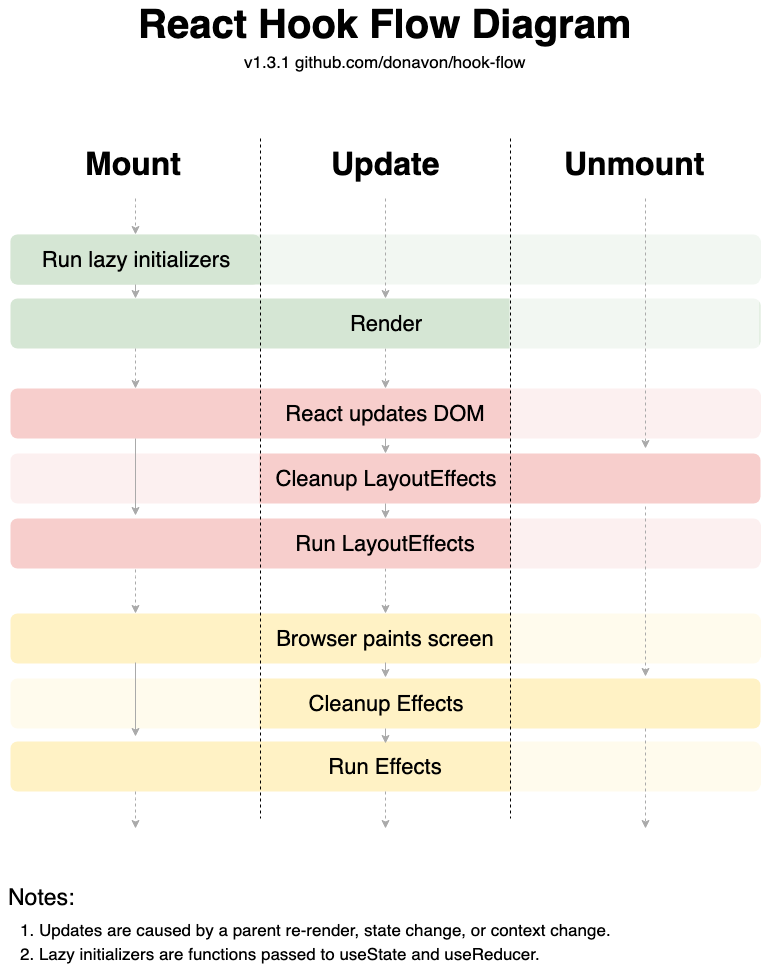
  // to make this even more generic we used the useLayoutEffect hook to
  // make sure that we are correctly setting the mountedRef.current immediately
  // after React updates the DOM. Check the fig below explaining lifecycle of hooks.
  // Even though this effect does not interact
  // with the dom another side effect inside a useLayoutEffect which does
  // interact with the dom may depend on the value being set
  React.useLayoutEffect(() => {
    mountedRef.current = true
    return () => {
      mountedRef.current = false
    }
  }, [])

  return React.useCallback(
    (...args) => (mountedRef.current ? dispatch(...args) : void 0),
    [dispatch],
  )
}
Now, we can use the method like this:
const dispatch = useSafeDispatch(oldDispatch)
Implementing reset method
function useAsync(initialState) {
  const initialStateRef = React.useRef({
    ...defaultInitialState,
    ...initialState,
  })

  const [{status, data, error}, unsafeDispatch] = React.useReducer(
    (s, a) => ({...s, ...a}),
    initialStateRef.current,
  )

  const dispatch = useSafeDispatch(unsafeDispatch)

  const reset = React.useCallback(
    () => dispatch(initialStateRef.current),
    [dispatch],
  )
We used refs as they don't change between re-renders.
Basically, we are storing initialState in a ref and the reset method sets the state to initialState upon calling, pretty self-explanatory stuff.
We are almost done with our hook, we just need to wire up things together. Let's review what we have implemented till now:
- functionality to handle async code
- functionality to handle success, pending, and error state
- memoization for efficiency
- functionality to pass own custom initialState
- functionality to reset current state
- Safe dispatch to handle calling of dispatch method upon mounting and unmounting
Phew, that is a lot of work and I hope you are enjoying it.
Wiring things together
After wiring everything, the useAsync hook looks like this:
function useSafeDispatch(dispatch) {
  const mounted = React.useRef(false)

  React.useLayoutEffect(() => {
    mounted.current = true
    return () => (mounted.current = false)
  }, [])
  return React.useCallback(
    (...args) => (mounted.current ? dispatch(...args) : void 0),
    [dispatch],
  )
}

const defaultInitialState = {status: 'idle', data: null, error: null}

function useAsync(initialState) {
  const initialStateRef = React.useRef({
    ...defaultInitialState,
    ...initialState,
  })
  const [{status, data, error}, setState] = React.useReducer(
    (s, a) => ({...s, ...a}),
    initialStateRef.current,
  )

  const safeSetState = useSafeDispatch(setState)

  const setData = React.useCallback(
    data => safeSetState({data, status: 'resolved'}),
    [safeSetState],
  )
  const setError = React.useCallback(
    error => safeSetState({error, status: 'rejected'}),
    [safeSetState],
  )
  const reset = React.useCallback(
    () => safeSetState(initialStateRef.current),
    [safeSetState],
  )

  const run = React.useCallback(
    promise => {
      if (!promise || !promise.then) {
        throw new Error(
          `The argument passed to useAsync().run must be a promise. Maybe a function that's passed isn't returning anything?`,
        )
      }
      safeSetState({status: 'pending'})
      return promise.then(
        data => {
          setData(data)
          return data
        },
        error => {
          setError(error)
          return Promise.reject(error)
        },
      )
    },
    [safeSetState, setData, setError],
  )

  return {
    isIdle: status === 'idle',
    isLoading: status === 'pending',
    isError: status === 'rejected',
    isSuccess: status === 'resolved',
    setData,
    setError,
    error,
    status,
    data,
    run,
    reset,
  }
}

export {useAsync}
Yay, we are done.🎉
That was huge, and I hope you are more excited than tired and I hope you got to learn something new today. Legends say
"one needs to write or teach what one has learned to remember the concepts."
Why don't use the comment section as your writing pad and write your finding, also if you have some criticism, suggestions? feel free to write.
This hook is used extensively throughout Kent C. Dodds Epic React workshop. He teaches a lot of cool and advanced topics in his course, he is the author of this hook and I have learned to build it from scratch from his course.
A little about me, I am Harsh and I love to code, I feel at home while building web apps in React. I am learning Remix currently. Also, I am looking for a Front-end developer position, if you have an opening, please reach out to me.
- This is part 2 of
useAsynchook series - Find part 1 here .
- I am so excited for part 3 as we will be writing tests for the hook.
I am also planning to share my learnings through such blogs in Future, Let's keep in touch!